

How to manage Zeus AI Knowledge Snippets
Last updated September 17, 2026
Overview
In this section, you can manage the knowledge snippets that help Zeus AI answer questions accurately. Zeus AI can auto-generate knowledge from configured data sources, or you can manually add documents and manage existing snippets.
Key features
- Integrated Snippet Management: Centralizes both auto-generated knowledge (from configured data sources) and manually created snippets in one place.
- Automatic Publishing: Knowledge snippets auto-generated from configured data sources are published immediately upon creation.
- Manual Snippet Creation: Customers can create knowledge snippets manually and publish them when they are ready.
- Pending Suggestions for Published Snippets: When a published snippet is manually edited, the changes are not published automatically. They are presented as pending changes for review. You can review the changes and publish them manually when ready.
- Status & Lifecycle Control:
- Draft: Saved but inactive (Zeus AI cannot access or use draft snippets to answer questions).
- Published: Live and active (Zeus AI automatically uses these snippets to generate responses).
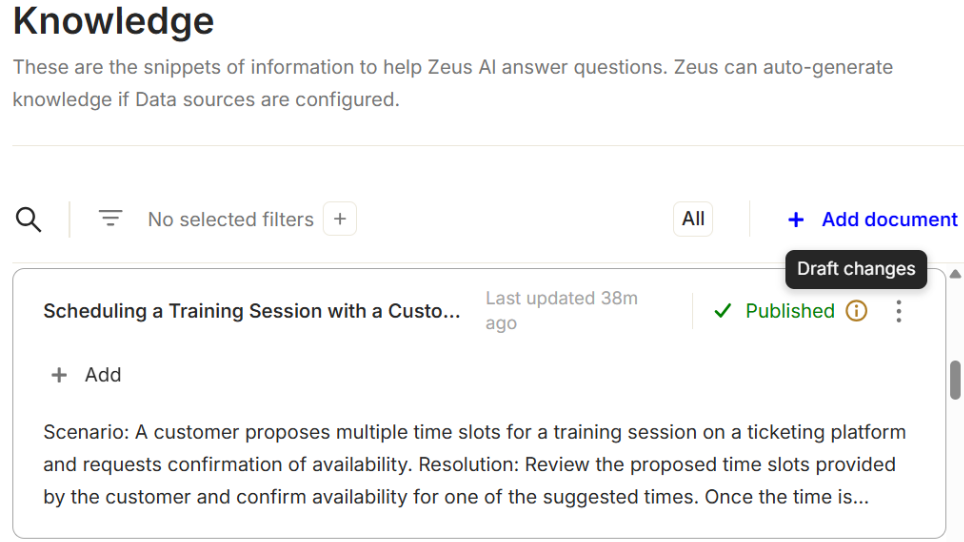
- Draft changes: Edit published snippets without interrupting live responses until you explicitly select Publish changes (indicated by the "Draft changes" icon).
- Quick Creation & Duplication: Add manual snippets from scratch or duplicate existing ones to quickly create new documents.
- Instant Unpublishing & Permanent Deletion:
- Unpublish: Immediately disable a snippet by reverting it back to a Draft.
- Delete: Permanently remove snippets that are no longer needed (cannot be restored).
How to open knowledge snippets
- To view the snippets that feed Zeus AI, navigate to " Zeus AI > Agent > Knowledge ".
- Here you will find both auto-generated and manually added knowledge snippets, along with their status and management options.
Important: Auto-generated snippets are created directly from your configured data sources and published immediately upon creation. Status are: •Draft: The snippet is saved but not active. Zeus AI cannot access or use draft snippets to answer questions. •Published: The snippet is live and active. Zeus AI will automatically use published snippets, including auto-generated ones, which are published immediately, to generate responses.
How to manually create knowledge snippets for Zeus AI
- To manually create a new knowledge snippet for Zeus AI, navigate to " Zeus AI > Agent > Knowledge " and click "+Add document".
- Enter a descriptive title and the snippet content, then click "Create". The snippet will be saved as a "Draft".
Important: Drafts are not available to Zeus AI until they are published.
How to edit a knowledge snippet
- To edit a knowledge snippet, go to " Zeus AI > Agent > Knowledge ", then locate snippet to edit, click the on it or click the ellipsis icon and select "Edit".
- Apply the changes in the content.
Important: When a published snippet is edited, a notification will appear indicating that there are pending changes and its status is updated including the "Draft changes" icon. Click "Publish changes" to apply them, or "Go back" to return to the snippets list.

Published snippets with unsaved changes will display the Draft changes icon.
How to duplicate a knowledge snippet
- To duplicate a knowledge snippet, go to " Zeus AI > Agent > Knowledge ", then locate snippet to duplicate, click the ellipsis icon and select "Duplicate".
- The interface displays the duplicated content. Review and edit it as needed, then click "Create" to save it.
How to publish a knowledge snippet
- To publish a knowledge snippet (a Draft ot , go to " Zeus AI > Agent > Knowledge ", then locate snippet to publish, click the ellipsis icon and select "Publish".
Important: Only Drafts and Published snippets with unsaved changes can be published. Once published, the snippet is live and active. Zeus AI will automatically use published snippets (including auto-generated ones, which are published immediately) to generate responses.
How to unpublish a knowledge snippet
- To unpublish a knowledge snippet, go to " Zeus AI > Agent > Knowledge ", then locate snippet to unpublish, click the ellipsis icon and select "Unpublish".
Important: •Only Published snippets can be unpublished. •Once unpublished, the snippet is disabled and marked as Draft. •Zeus AI will no longer use unpublished snippets to generate responses.
How to delete a knowledge snippet
- To delete a knowledge snippet, go to " Zeus AI > Agent > Knowledge ", then locate snippet to delete, click the ellipsis icon and select "Delete".
- Click "OK" to confirm the action.
Important: Deleted knowledge snippets cannot be restored.
How to add a customer profile to a knowledge snippet
You can manage different chat experiences for different customer personas and use cases. Each profile can have its own knowledge base.
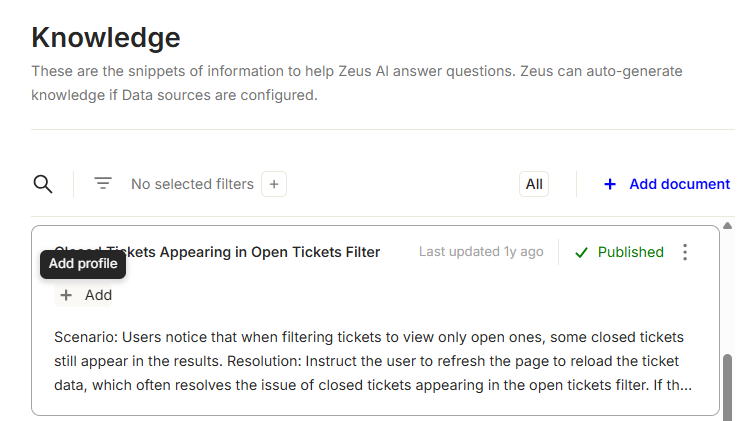
- To add a customer profile to a knowledge snippet, go to " Zeus AI > Agent > Knowledge ", then locate snippet and click "+Add".
- Select the desired profiles from the dropdown.
Important: The displayed profiles were previously created under " Zeus AI > Configuration > Profiles ", and mapped under " Zeus AI > Configuration > Profile mapping ".
FAQs & Troubleshooting
What is the Knowledge section in Zeus AI?
It is where you manage the snippets of information that Zeus AI uses to answer questions. This includes both auto-generated knowledge from configured data sources and manually created documents.
What is the difference between a "Draft" and a "Published" snippet?
- Draft: The snippet is saved but not active. Zeus AI cannot access or use draft snippets to generate responses.
- Published: The snippet is live and active. Zeus AI will automatically use published snippets to answer questions.
Are auto-generated snippets active right away?
Yes. Snippets created automatically from your configured data sources are published immediately. Manual snippets, however, need to be published manually.
Why isn't Zeus AI using my recent updates to a published snippet?
When you edit a published snippet, the updates remain pending until you explicitly publish them. Look for the Draft changes icon on the snippet and select "Publish changes" to make your edits live.
What happens when a snippet is unpublished?
When unpublished, the snippet is disabled and marked as a Draft. Zeus AI will immediately stop using it to answer questions.
Can a deleted knowledge snippet be restored?
No. Once a knowledge snippet is deleted and confirmed, it is permanently removed and cannot be recovered.